
Is someone who left your business still logged in?
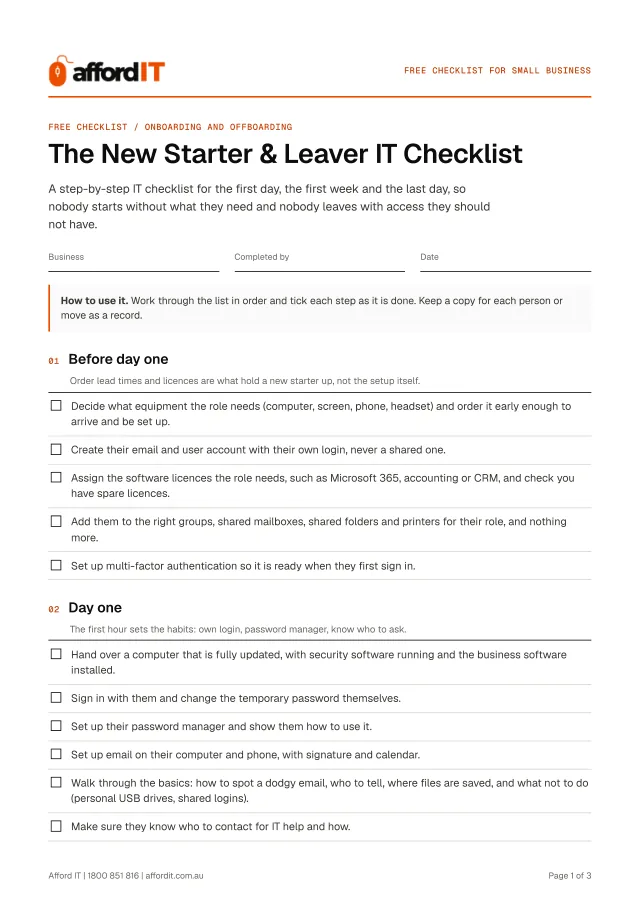
Our free 24-step checklist puts everything in the right order, so nothing gets missed.
- Clear steps, in the right order
- Tick them off as you go
- Printable PDF included
4.9 Google rating for Defy IT, the same Brisbane team
Get it free. Instantly.
The 24-step checklist opens straight away, with a PDF to print.
- Brisbane IT business
- Onsite and remote support
- No contracts, no callout fee
- Your details are never sold
Four stages, one list
Each point is a plain statement. If it is true for your business, you tick it. If it is not, it goes on your list of gaps. You get it as a tick-as-you-go page and as a printable PDF.
- 01 Before day oneOrder lead times and licences are what hold a new starter up, not the setup itself. 5 points
- 02 Day oneThe first hour sets the habits: own login, password manager, know who to ask. 6 points
- 03 First weekSmall access problems surface on the second or third day, once they try real work. 4 points
- 04 When someone leavesDo these on the last day, in this order. Disabling access first is what protects you. 9 points
For example: “Decide what equipment the role needs (computer, screen, phone, headset) and order it early enough to arrive and be set up.”
Why onboarding and offboarding IT matters
Most small businesses handle new starters and leavers from memory. The result is predictable: the new person waits for a login, and the leaver keeps theirs. A forgotten account on a cloud app or a shared mailbox can stay open for years.
This list puts the steps in the right order. Use it for every starter and leaver, and keep a copy for each person as a record of what was done and when.
Made for you if:
- You are hiring and want the new person productive on day one, not day four
- Someone is leaving and you are not sure what to switch off, or in what order
- You have been burned by a leaver who still had access to email or files weeks later

New Starter & Leaver Checklist FAQs
- How far ahead should IT be set up for a new starter?
- Order equipment and create accounts before day one. Equipment lead times, not the setup itself, are what usually hold a new starter up.
- What should I do with a leaver's mailbox?
- Do not delete it straight away. Forward it to a manager, convert it to a shared mailbox or archive it, move their files, and only then remove the licence.
- Does this apply to contractors and casual staff?
- Yes. Anyone with a login or access to business data needs the same process, and contractors are the ones most often forgotten when they leave.
- Is it really free?
- Yes. The checklist is free, and you are under no obligation to buy anything or book anything. If you would like help with what it turns up, we can do that as pay-as-you-go work, but that is your call.
- What happens to my details?
- We use them to send you the checklist and to follow up about it. We do not sell or share your details. See the Privacy Policy for the full version.
- Do I need to be an Afford IT customer?
- No. The checklist works for any small business, whoever looks after your IT today.
- Who is Afford IT?
- A Brisbane IT support business with a workshop in Indooroopilly. We support small businesses on a pay-as-you-go basis: no contract and no monthly minimum, onsite across Brisbane, Ipswich, Moreton Bay and Logan, and remotely for the Gold Coast and Sunshine Coast.
Ten minutes now can save you a bad week later.
Prefer to talk it through? Call 1800 851 816, Mon–Fri 8:30am–4:30pm or Sat 9am–2pm.
Get it free. Instantly.
The 24-step checklist opens straight away, with a PDF to print.