
If your computers died tonight, could you trade tomorrow?
Take our free 15-point checklist. Tick what is true for your business and see exactly where the gaps are.
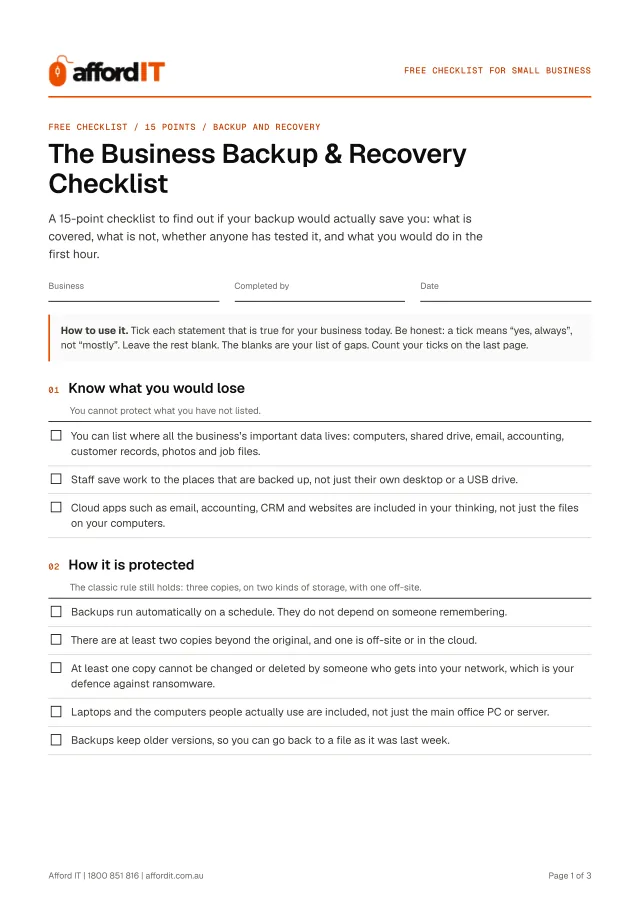
- Tick what is true, in about ten minutes
- See your score and your list of gaps
- Printable PDF included
4.9 Google rating for Defy IT, the same Brisbane team
Get it free. Instantly.
The 15-point checklist opens straight away, with a PDF to print.
- Brisbane IT business
- Onsite and remote support
- No contracts, no callout fee
- Your details are never sold
The 15 points, in four groups
Each point is a plain statement. If it is true for your business, you tick it. If it is not, it goes on your list of gaps. You get it as a tick-as-you-go page and as a printable PDF.
- 01 Know what you would loseYou cannot protect what you have not listed. 3 points
- 02 How it is protectedThe classic rule still holds: three copies, on two kinds of storage, with one off-site. 5 points
- 03 Proof it worksA backup that has never been restored is a guess. 3 points
- 04 If the worst happensWhen the computers are gone, so is everything stored on them, including the instructions. 4 points
For example: “You can list where all the business’s important data lives: computers, shared drive, email, accounting, customer records, photos and job files.”
Why a backup you have not tested is not a backup
Backups fail quietly. The drive fills up, the subscription lapses, the laptop that was never included dies. You find out when you need the backup, which is the worst time to learn it was not working.
Backup is only half of recovery. The other half is knowing what comes back first, how long it takes and who does it. This checklist covers both. Tick what is true, and treat the gaps as the priority list.
Made for you if:
- You have a backup, but you are not sure what it covers or whether it works
- Your files live on a mix of computers, a shared drive, cloud apps and people’s desktops
- You would like to know how long you would be out of action after a failure, theft, fire or ransomware attack

Backup & Recovery Checklist FAQs
- What is the 3-2-1 backup rule?
- Keep three copies of your data, on two different kinds of storage, with one copy off-site. It is the standard starting point for a small business.
- How often should I test my backup?
- At least every six months, by restoring a real file, and again after any change to your computers or software.
- Is OneDrive or Google Drive a backup?
- Syncing is not the same as backing up. If a file is deleted or encrypted by ransomware, the change can sync everywhere. A real backup keeps older versions you can go back to.
- Is it really free?
- Yes. The checklist is free, and you are under no obligation to buy anything or book anything. If you would like help with what it turns up, we can do that as pay-as-you-go work, but that is your call.
- What happens to my details?
- We use them to send you the checklist and to follow up about it. We do not sell or share your details. See the Privacy Policy for the full version.
- Do I need to be an Afford IT customer?
- No. The checklist works for any small business, whoever looks after your IT today.
- Who is Afford IT?
- A Brisbane IT support business with a workshop in Indooroopilly. We support small businesses on a pay-as-you-go basis: no contract and no monthly minimum, onsite across Brisbane, Ipswich, Moreton Bay and Logan, and remotely for the Gold Coast and Sunshine Coast.
Ten minutes now can save you a bad week later.
Prefer to talk it through? Call 1800 851 816, Mon–Fri 8:30am–4:30pm or Sat 9am–2pm.
Get it free. Instantly.
The 15-point checklist opens straight away, with a PDF to print.