
Is your Microsoft 365 secure, or just switched on?
Take our free 18-point checklist. Tick what is true for your business and see exactly where the gaps are.
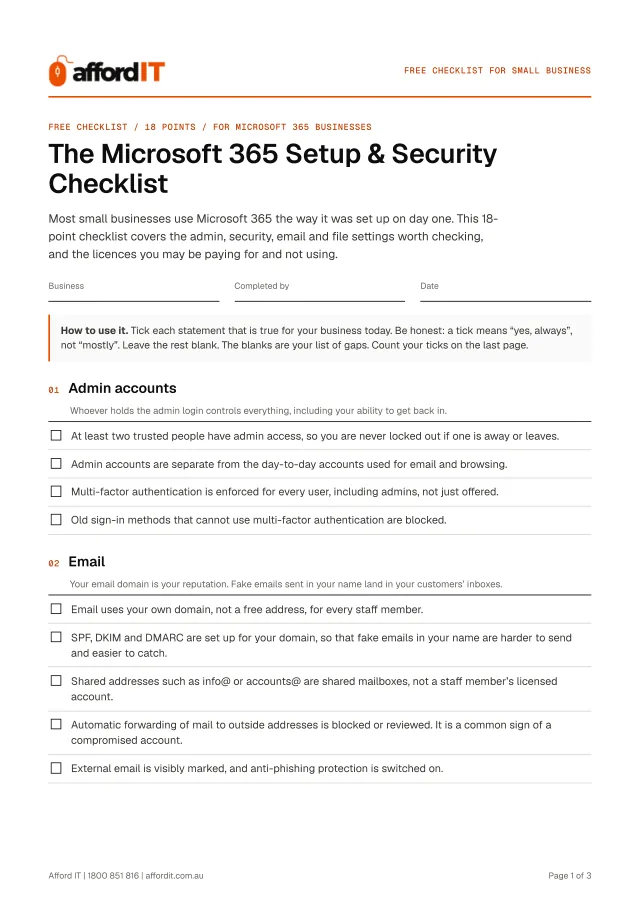
- Tick what is true, in about ten minutes
- See your score and your list of gaps
- Printable PDF included
4.9 Google rating for Defy IT, the same Brisbane team
Get it free. Instantly.
The 18-point checklist opens straight away, with a PDF to print.
- Brisbane IT business
- Onsite and remote support
- No contracts, no callout fee
- Your details are never sold
The 18 points, in five groups
Each point is a plain statement. If it is true for your business, you tick it. If it is not, it goes on your list of gaps. You get it as a tick-as-you-go page and as a printable PDF.
- 01 Admin accountsWhoever holds the admin login controls everything, including your ability to get back in. 4 points
- 02 EmailYour email domain is your reputation. Fake emails sent in your name land in your customers’ inboxes. 5 points
- 03 Files, OneDrive and TeamsA file saved only on one computer’s desktop is a file one failure from being lost. 3 points
- 04 DevicesThe accounts are only as safe as the computers that open them. 3 points
- 05 Licences, billing and backupPaying for licences nobody uses is common, and so is assuming Microsoft backs up everything. 3 points
For example: “At least two trusted people have admin access, so you are never locked out if one is away or leaves.”
Why Microsoft 365 needs more than the default settings
Microsoft 365 holds your email, files and calendar, which means one compromised account can expose all three. The security settings that protect it exist, but many of them are not on by default or only apply to some users.
These checks are a good place to start. A few depend on which Microsoft 365 plan you have, so where a setting is not available to you, leave it unticked and note it. That is useful information too.
Made for you if:
- You use Microsoft 365 for email, Word, Excel, Teams or OneDrive, and nobody has reviewed the settings since it was set up
- You are not sure who your admins are, or whether multi-factor authentication is really switched on for everyone
- You want to know whether you are paying for licences you do not need

Microsoft 365 Checklist FAQs
- Is multi-factor authentication included in Microsoft 365?
- Yes, it is available in the business plans, but it is not always switched on for every user. Check that it is enforced rather than assuming it is.
- Does Microsoft back up my Microsoft 365 data?
- Microsoft keeps the service available, but protecting your data from accidental deletion, ransomware and mistakes is your responsibility. The recycle bin and retention settings help, but a separate backup is sensible.
- Which Microsoft 365 plan does a small business need?
- It depends on your size and needs. Business Standard covers the apps and email, while Business Premium adds device management and stronger security tools. We can advise on which fits.
- Is it really free?
- Yes. The checklist is free, and you are under no obligation to buy anything or book anything. If you would like help with what it turns up, we can do that as pay-as-you-go work, but that is your call.
- What happens to my details?
- We use them to send you the checklist and to follow up about it. We do not sell or share your details. See the Privacy Policy for the full version.
- Do I need to be an Afford IT customer?
- No. The checklist works for any small business, whoever looks after your IT today.
- Who is Afford IT?
- A Brisbane IT support business with a workshop in Indooroopilly. We support small businesses on a pay-as-you-go basis: no contract and no monthly minimum, onsite across Brisbane, Ipswich, Moreton Bay and Logan, and remotely for the Gold Coast and Sunshine Coast.
Ten minutes now can save you a bad week later.
Prefer to talk it through? Call 1800 851 816, Mon–Fri 8:30am–4:30pm or Sat 9am–2pm.
Get it free. Instantly.
The 18-point checklist opens straight away, with a PDF to print.